

Remember when getting a decent 3D printer meant spending a fortune and then fighting with manual bed leveling knobs for a week just to get a decent plastic boat? Thankfully, it’s 2026, and those expensive, frustrating days are long gone.
Now, finding the best 3D printer under $500 (or just slightly over, as you’ll soon see) means choosing between ridiculously fast machines that practically run themselves. The technology has leaped forward in the last two years, bringing professional features like CoreXY kinematics, AI detection, and seamless multi-color printing down to budget-friendly prices.
I’ve dug through the newest releases from late 2025 and early 2026 to see what’s actually worth your money right now. Whether you’re looking to print cosplay armor, functional prototypes, or just cool dragons in four colors, there is a perfect machine on this list for you.
The TL;DR: The Quick Picks
If you just want to know what to buy right now without reading the deep dive, here is the cheat sheet.
- If you can stretch your budget for the best quality: Get the Bambu Lab P2S. It’s the “it just works” premium standard.
- If you want the best sheer value and speed: Get the Elegoo Centauri Carbon. It’s shockingly fast and cheap.
- If you want easy multi-color prints: Get the Bambu Lab A1 Combo. It’s the most fun you can have 3D printing.
2026 Spec Showdown
Before we get into the individual reviews, let’s look at the raw numbers.
In 2026, don’t just look at “Max Speed.” Almost everyone claims 500mm/s now. The real differentiator is Acceleration. A printer with 20,000 mm/s² acceleration (like the P2S or Centauri) will finish a complex print much faster than one with 10,000 mm/s², even if their top speeds are the same, because it reaches that top speed instantly.
| Feature | Bambu Lab P2S | Elegoo Centauri Carbon | Bambu Lab A1 Combo | Elegoo Neptune 4 Plus | Creality SPARKX i7 |
| Price (Approx) | ~$599 | ~$400 | ~$559 (w/ AMS) | ~$398 | ~$399 |
| Build Volume | 256³ mm | 256³ mm | 256³ mm | 320x320x385 mm | 220x220x250 mm |
| Motion System | CoreXY (Enclosed) | CoreXY (Enclosed) | Bed Slinger (Open) | Bed Slinger (Open) | CoreXY (Enclosed) |
| Max Accel. | 20,000 mm/s² | 20,000 mm/s² | 10,000 mm/s² | 12,000 mm/s² | ~20,000 mm/s² |
| Max Nozzle | 300°C | 350°C (Hardened) | 300°C | 300°C | 300°C |
| Multi-Color | Optional (+$$) | Supported | Included | No | Supported |
| Best For | Professionals | Budget Speed | Beginners/Color | Large Props | AI Features |
Export to Sheets
1. Bambu Lab P2S
The “Prosumer” Benchmark
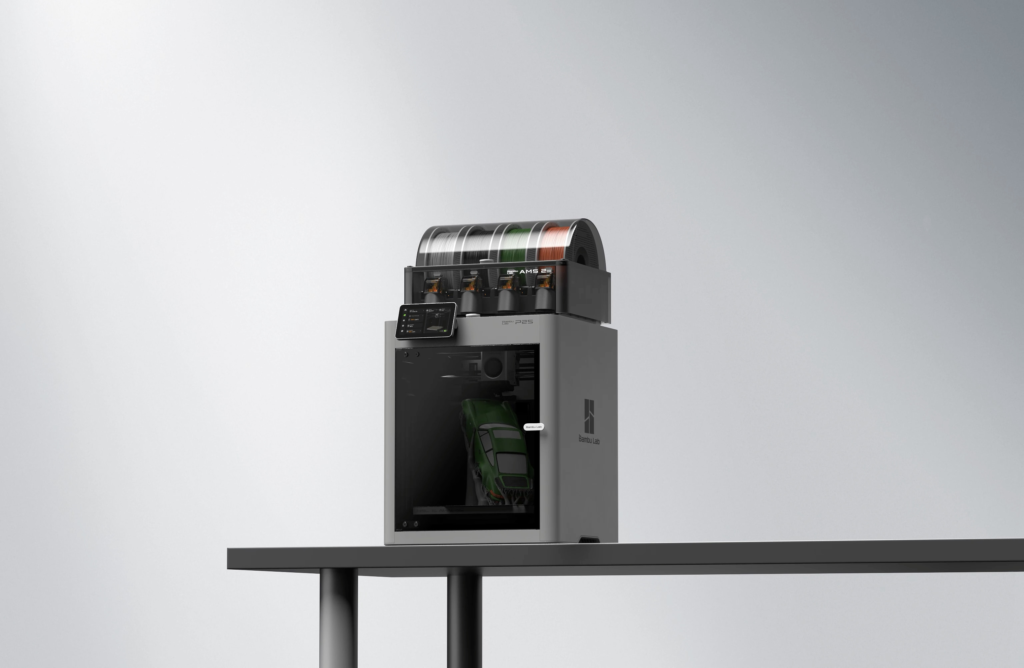
If your budget can stretch exactly to that $600 mark, the Bambu Lab P2S is currently the machine to beat. It’s an updated version of the wildly popular P1S, and it firmly sits in the “professional consumer” category.
This is a CoreXY machine, meaning the bed only moves up and down while the print head flies around at incredible speeds. Because it’s fully enclosed, it’s perfect if you plan on graduating from basic PLA filament to trickier materials like ABS or ASA, which need a warm, draft-free environment to prevent warping.
Bambu Lab’s ecosystem is very Apple-like. The printer, the slicer software, and the app all talk to each other seamlessly. The P2S features upgraded “Active Airflow” cooling and active motor noise cancellation, making it surprisingly quiet for how fast it moves. In my experience, this is the printer you buy if you want to spend 99% of your time printing and 1% of your time tinkering.
- Price: ~$599
- Link: Bambu Labs
- Build Volume: 256 x 256 x 256 mm
- Top Speed / Accel: 500 mm/s / 20,000 mm/s²
Pros:
- Professional print quality right out of the box.
- Fully enclosed design handles advanced materials easily.
- Excellent reliability and software ecosystem.
Cons:
- It sits right at the top edge of this budget bracket.
- If you want multi-color printing, adding the AMS unit pushes the price way over $600.
Pro Tip: If you plan on printing PLA (the most common plastic) with the door closed, make sure to vent the top lid. The chamber gets so warm that PLA can sometimes get soft inside the extruder and clog if you don’t let some heat out.
2. Elegoo Centauri Carbon
The Budget Speed Demon
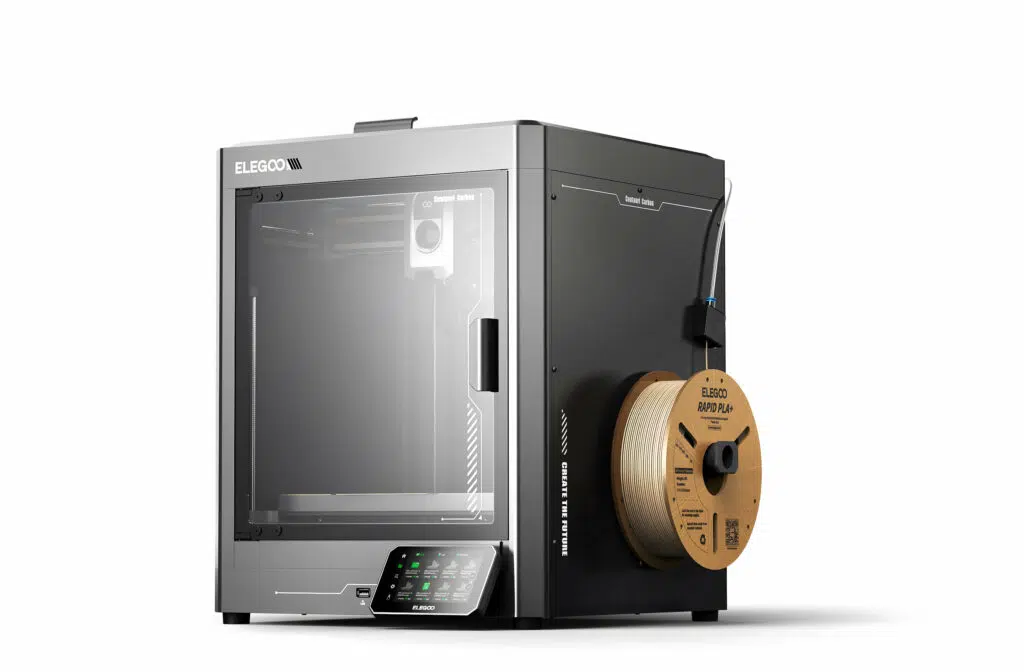
The Elegoo Centauri Carbon is the disruptor of early 2026. It has absolutely no business being this good for under $300. Elegoo looked at the premium CoreXY market and decided to undercut everyone aggressively.
Like the Bambu P2S, this is a fully enclosed CoreXY printer. But Elegoo equipped it with blazing fast 20,000 mm/s² acceleration. In many real-world print tests, this machine is neck-and-neck with printers that cost twice as much.
One thing most reviews don’t mention enough is the nozzle. It comes stock with a hardened steel nozzle capable of reaching 350°C. This means out of the box, you can print abrasive carbon-fiber-filled filaments or high-temp industrial nylon without needing to buy upgrades. It is an incredible value proposition.
- Price: ~$400
- Link: Amazon
- Build Volume: 256 x 256 x 256 mm
- Top Speed / Accel: 500 mm/s / 20,000 mm/s²
Pros:
- Unbeatable price for an enclosed CoreXY machine.
- Incredible acceleration makes for very fast print times.
- Ready for abrasive materials (carbon fiber) immediately.
Cons:
- Elegoo’s software isn’t quite as polished or intuitive as Bambu Studio yet.
- At top speeds, the auxiliary cooling fans can get pretty loud.
Pro Tip: This printer has a LAN port. If you are worried about Wi-Fi security or have a spotty connection in your workshop, you can plug it directly into your router for a rock-solid connection, something many modern Wi-Fi-only printers lack.
3. Bambu Lab A1 Combo
The Multi-Color Master for Beginners
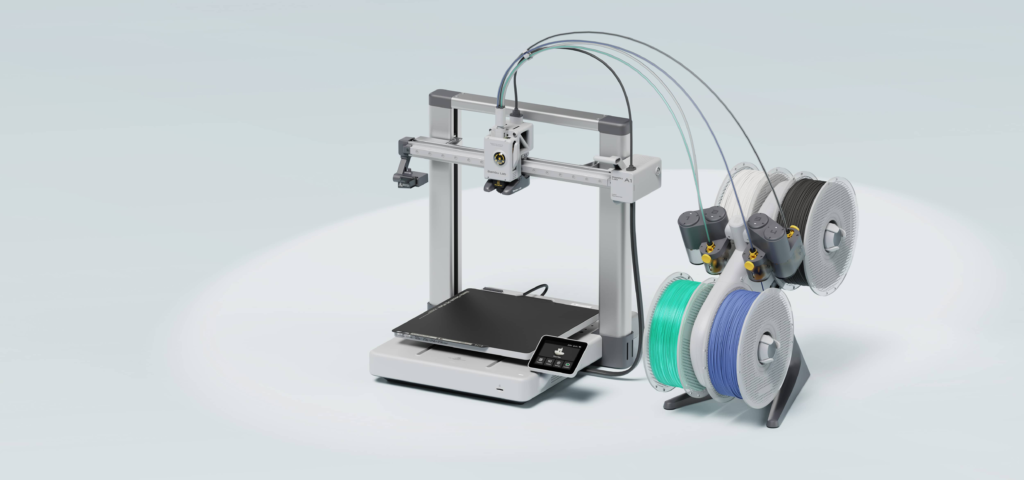
If you have seen those incredible multi-colored dragons or articulated toys on TikTok and want to make them yourself, this is the printer you want.
The Bambu Lab A1 is a “bed slinger” design (the bed moves back and forth). Usually, that design is slower, but Bambu engineered this thing to be incredibly rigid and fast. The real magic, however, is the “Combo.” For under $600, you get the printer and the AMS Lite unit, which feeds four different colors of filament automatically.
It is arguably the most user-friendly printer on this entire list. It handles its own calibration, vibration compensation, and Z-offset every before every print. You pretty much just hit “slice” and walk away. If you are brand new to 3D printing, the A1 removes almost all the intimidation factors.
- Price: ~$559 (includes AMS Lite)
- Link: Bambu Labs
- Build Volume: 256 x 256 x 256 mm
- Top Speed / Accel: 500 mm/s / 10,000 mm/s²
Pros:
- Seamless 4-color printing included in the price.
- Easiest setup and calibration experience for beginners.
- Quick-swap nozzles make maintenance a breeze.
Cons:
- It’s an open-frame design, so it’s not great for ABS or ASA filament.
- Because the bed moves back and forth, it needs more desk depth than the CoreXY printers.
Pro Tip: Multi-color printing creates “poop”—little purged bits of filament when it changes colors. The A1 poops these out the side. Before your first multi-color print, make sure you print a little “poop chute” bucket to catch them, or your desk will be covered in plastic confetti.
4. Elegoo Neptune 4 Plus
When Size Matters Most
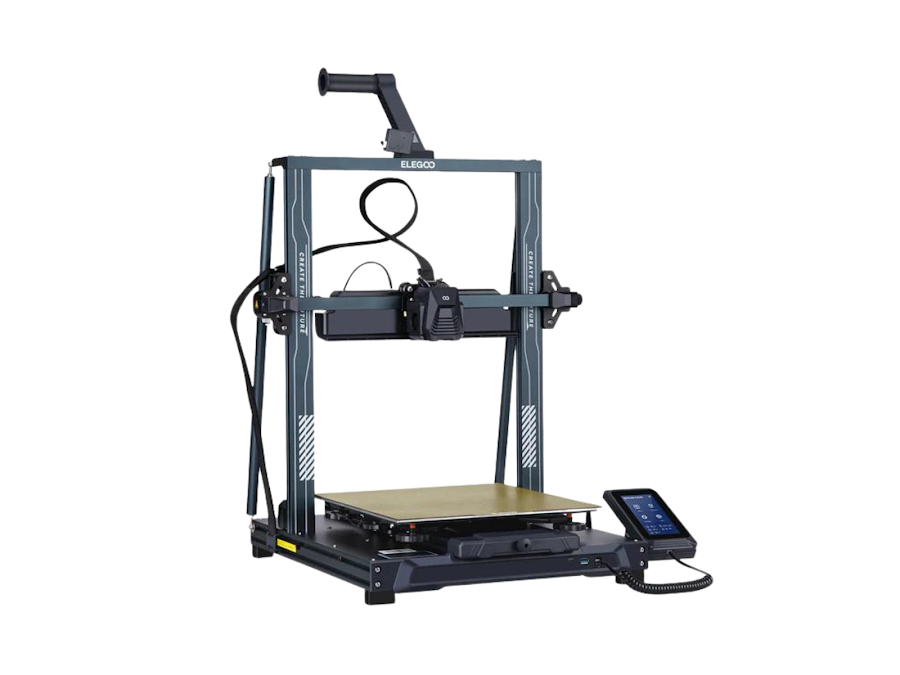
Sometimes, a standard 250mm cube just isn’t enough. If you are into cosplaying and need to print a full-sized helmet in one piece, or you need large architectural prototypes, the Elegoo Neptune 4 Plus is your answer.
It offers a massive 320x320x385mm build volume. A few years ago, a printer this big was agonizingly slow. But Elegoo runs this machine on Klipper firmware, a high-performance software that allows this big beast to move surprisingly fast.
To handle laying down that much molten plastic quickly, it has massive auxiliary cooling fans mounted on the gantry that look like jet engines. They are loud, but they ensure your giant prints have perfect overhangs.
- Price: ~$400
- Link: Amazon
- Build Volume: 320 x 320 x 385 mm
- Top Speed / Accel: 500 mm/s / 12,000 mm/s²
Pros:
- Huge build volume for the price point.
- Excellent print quality on large objects.
- Klipper firmware is pre-installed and powerful.
Cons:
- It has a massive footprint; you need a large, very sturdy table for it.
- It still has manual bed leveling wheels (even though it has auto-leveling), which can confuse new users who think they have to use them.
Pro Tip: Because this printer bed is so large, it takes a long time to heat up evenly. Let the bed sit at its target temperature for about 5-10 minutes before you start a print to ensure the edges are just as hot as the center. This prevents large prints from warping off the bed.
5. Creality SPARKX i7
The AI-Powered Appliance
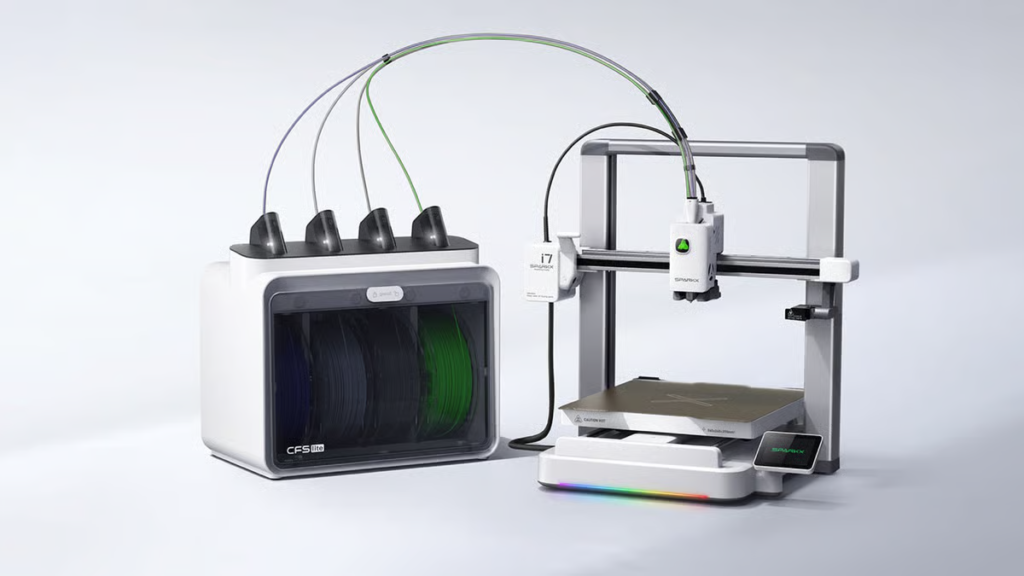
Creality is the company that popularized budget 3D printing with the Ender 3 years ago. For 2026, they have launched the SPARKX line, which tries to turn the 3D printer from a workshop tool into a household appliance.
The SPARKX i7 is compact, fully enclosed, and looks great on a desk. Its main selling point is AI integration. It has features like “AI Photo-to-3D” in its app, which attempts to generate printable 3D models from simple photos you take on your phone.
While enthusiasts might find the ecosystem a bit locked down compared to others, for someone who has absolutely zero technical knowledge and just wants to press a button on their phone and get a physical object, this is a compelling option. It also supports their new “CFS Lite” for basic multi-color work.
- Price: ~$399
- Link: Creality
- Build Volume: 220 x 220 x 250 mm
- Top Speed / Accel: 500 mm/s / ~20,000 mm/s²
Pros:
- Very beginner-friendly “appliance” feel.
- Fun AI software features for generating models.
- Compact, enclosed design fits easily in a home office.
Cons:
- The build volume is slightly smaller than the standard 256mm.
- The ecosystem is more “walled garden” than open-source alternatives.
Pro Tip: The AI print failure detection on the camera is pretty sensitive. It’s great because it stops a failed print before it makes a huge mess, but you may need to adjust the sensitivity settings in the app so it doesn’t pause prints that are actually doing just fine.
Final Verdict: Which One Should You Buy?
The race for the best 3D printer under $500 has never been closer. The gap between a $300 machine and a $1000 machine has shrunk significantly in 2026.
Here is my final recommendation based on who you are:
- For the absolute beginner who wants fun colors: Don’t overthink it. Get the Bambu Lab A1 Combo. The reliability and included multi-color system make it a joy to use.
- For the cosplayer or prop maker: Size is king. The Elegoo Neptune 4 Plus gives you the real estate you need without sacrificing too much speed.
- For the savvy shopper looking for the best deal: The Elegoo Centauri Carbon is incredible value. An enclosed, high-speed CoreXY that can print carbon fiber for under $400 is a steal in today’s market.
Happy printing!